It is possible to configure custom questions, in addition to those that the booking engine already shows by default, in sections such as extras, guest information, and in the modal that opens when starting the booking cancellation process.
To configure these questions, go to Communication > Forms > Create new; the following screen will be displayed:
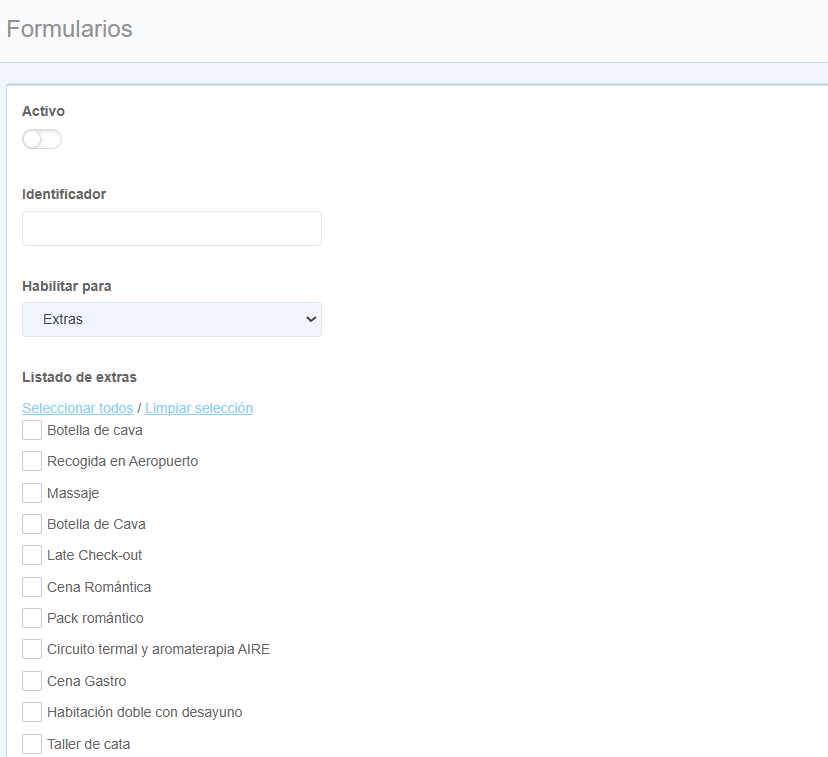
In the "Enable for:" field, you must select which section you want to assign the question to.
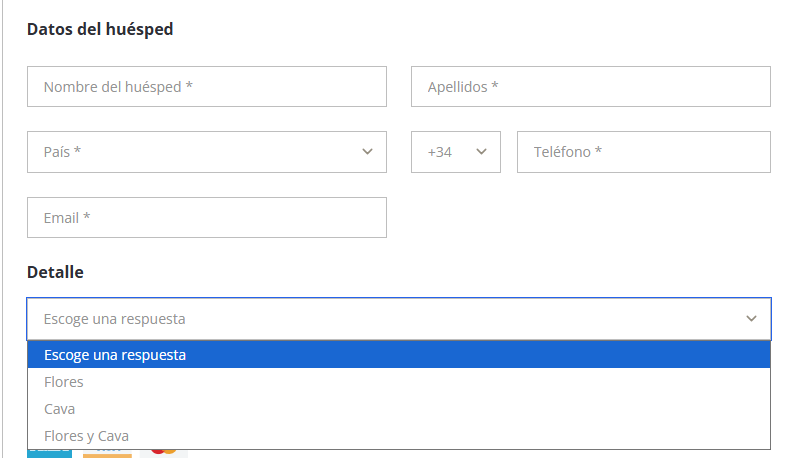
They would be displayed as follows on the front end of the booking engine:
- Extras: all extras created in the extranet are shown in a list, and you must select which one you want to apply the question to.
- Guest form: you can add additional fields for the user to fill in, apart from those that already come by default in the booking engine.
- Cancellation modal: you can add a question within the pop-up (modal) that appears when a guest decides to cancel their booking.
Once assigned to which section the question should be assigned, you must proceed with creating them.
Questions can be mandatory or not, and you can select the type of answer to apply:
- Free text: a field where the user can enter text.
- Dropdown: options should be separated by a comma.
- Stay day selector: the user can select one of the days within their booking period from a dropdown.
Was this article helpful?
That’s Great!
Thank you for your feedback
Sorry! We couldn't be helpful
Thank you for your feedback
Feedback sent
We appreciate your effort and will try to fix the article