Who is searching in your engine? New query report in the backoffice!
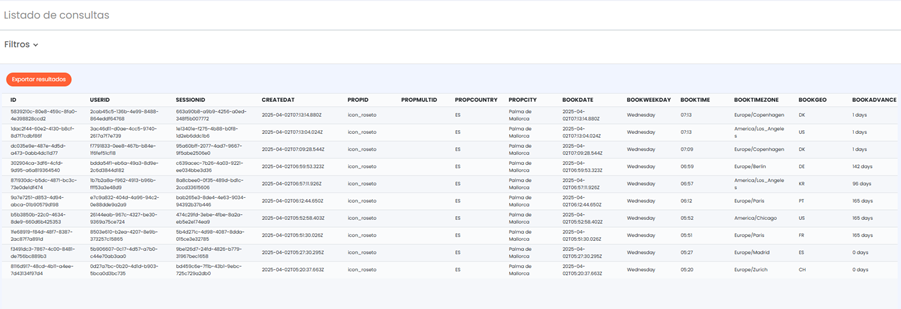
We want to share with you an important improvement in the Query Report of our booking engine. Now, this report is much more complete and will allow you to access key information more clearly and in detail.
I had never used it, what can I find?
In the backoffice booking list you have all confirmed, cancelled, pending, and failed payment bookings.
- In the query list, in addition to all the bookings from the booking list, you will find all visits to the engine that did not end in a booking.
This information is very valuable when figuring out how your clients behave and the reasons why they don't book.
Featured fields in the report:
- NOAVAILABILITY: if the search had availability or not
- FUNNEL : at which step of the engine they abandoned their search or if they completed the booking (‘BOOKED’)
- BOOKGEO : guest country
- EXTRASQUANTITY : if the search had extras
- GLOBALRESTRICTIONS: In the GlobalRestriction column, the restriction must be from the set of accommodations we have.
For example, if we have a double and a triple room, both must have a minimum stay of 3 days (for example), for MIN_STAY to appear in the column.
Other featured fields:
- USER ID: when a user makes many searches, this field is the same.
- SESSIONID : For each search made, a sessionID is created. However, we must consider that if we already have something in the cart, a new one is not created; the same one is kept.
- BOOKDATE, BOOKTIME: The hours shown in the query list are currently UTC+2. That is, if we see that in the createdAt, BookDate, and BookTime columns it says 12:11h, it means that in our time zone it would be 14:11h. This is important when looking at bookings, as the time shown in the query list is -2 hours:
Example: if a booking is made at 1:22 AM on 6/04, in the query list it would appear as 11:22 PM on 5/04.
- BOOKADVANCE: lead time
- AVAILABLEROOMS: how many rooms the guest had available when searching.
- MINPRICE, AVGPRICE, MAXPRICE: what prices the guest had when searching.
- REFERRER, ORIGIN, SOURCE: where that visit came from
- TAG: which engine feature was active (split stay...)
- DEVICE: from what type of device the search was made (mobile...)
I've consulted it before, what are the main new features?
- ✅ MXXXXXX Column: only this reference is registered, eliminating P.
✅ Multiple booking with different dates: Multiple booking with different dates: in the CheckIn and CheckOut columns, the extreme dates will be used. That is, if from 04/10 to 04/12 we have booked the Double room, and from 04/12 to 04/14 we have the Triple room, in those two columns it will appear 04/10 as CheckIn and 04/14 as CheckOut.
✅ Total passengers: the total from the first search made is maintained and the final total of the booking is reflected.
✅ Average price (AVGPrice): The AVGPrice always maintains the calculation from Step 1. That is, when we go to step 2, it is not recalculated according to the rates, it remains the same as in step 1.
✅ More agile filtering: you can now filter data for a maximum period of 31 days.
✅ Mandatory extras: new "MandatoryExtras" column, where a "1" indicates mandatory extras and a "0" indicates none.
These improvements will allow you to manage information with greater precision and optimize decision-making in your day-to-day.
Was this article helpful?
That’s Great!
Thank you for your feedback
Sorry! We couldn't be helpful
Thank you for your feedback
Feedback sent
We appreciate your effort and will try to fix the article