For those clients with a variable or mixed contract, the invoice will include the total amount of the bookings corresponding to the month.
If you need to obtain the detail of the individual bookings included in the invoice, the client must manually download the list from Bookings → List.
1. Configure filters
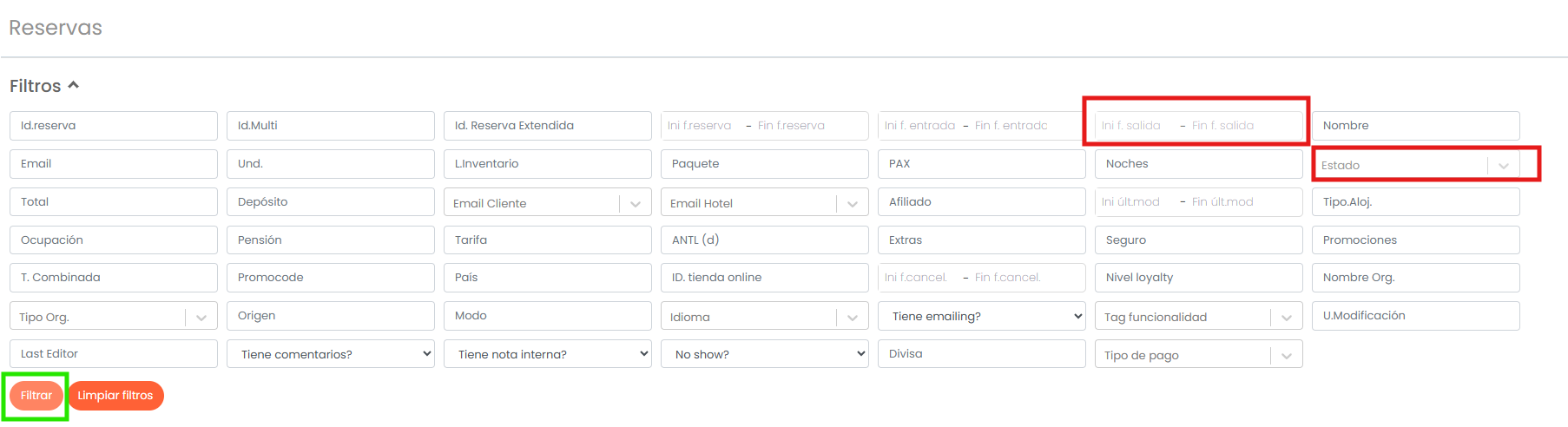
Once inside the booking list, apply the following filters:
- Departure date: indicate the first day of the month as the start date and the last day of the corresponding month as the end date.
- Status: open the dropdown and select OK, which corresponds to confirmed bookings and appears in green in our system.
Any booking that has not been marked as cancelled or no-show before the end of the month will be included in the commission for that month.
Once both parameters are configured, click Filter.
Important: before performing the search, check that no filters from a previous query have been saved.
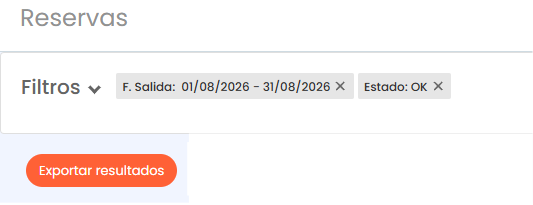
When minimizing the filter panel, the two applied filters should be visible: departure date and OK status.

2. Download the list
Once the filters are applied, you can download an Excel file with all bookings that meet the selected criteria.
The Excel file will include all bookings for that month that are included in the invoice.
3. Calculate commission amount
To obtain the total amount on which the commission is calculated, you must sum column P, "Total amount".
The result of this sum corresponds to the total amount of the month's bookings on which the commission will be applied.
Was this article helpful?
That’s Great!
Thank you for your feedback
Sorry! We couldn't be helpful
Thank you for your feedback
Feedback sent
We appreciate your effort and will try to fix the article