Here are the steps to follow if you want a room to be available only through a specific code:
Inventory > Define inventory > Edit inventory by Excel > Download Excel file, download the inventory table in Excel and enter the text you want in the Codes column and in all applicable inventory lines, so that these lines are only displayed if this code is applied in the front end of the engine:

Later, once you save the Excel file and upload it again to the back office by clicking on Import file, the changes will be saved in the back office. And in Inventory > Define inventory > Inventory table, you will be able to see the codes applied to each inventory line:
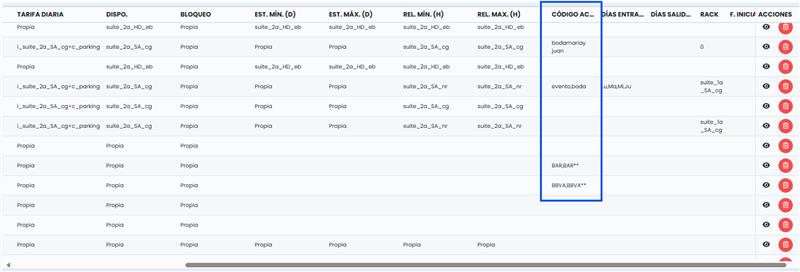
NOTE: To offer a rate protected by code that blocks the rest of the available inventory, you must carry out the creation process to the engine as in the steps mentioned above, but the promotional code must include 2 asterisks at the end. For example:
BODAPABLOYMARTA**
ENDESA**
Was this article helpful?
That’s Great!
Thank you for your feedback
Sorry! We couldn't be helpful
Thank you for your feedback
Feedback sent
We appreciate your effort and will try to fix the article