This type of email serves as a tool to increase conversion, encouraging customers who have abandoned the booking process at checkout to complete their reservation. This tool is configurable for bookings both with and without a loyalty system.
To use this type of email, the following steps must be followed:
- Request the functionality:
To activate this feature, you must contact Witbooking’s support team to request the activation of the cart abandonment email.
- Sign and receive the contract:
Witbooking will send the hotel an annex to the data processing agreement for signature before activating the cart abandonment feature. Once signed and returned, Witbooking will proceed with activation.
- Configure the email content
Once the functionality is active, go to:
- Communication > Custom Emails > Create New > Cart Abandonment
- Choose template type: “Default” or “Custom”
- Save
Important: Only one email template can be configured, which will be used for both bookings with Loyalty and without Loyalty.
- Review privacy policies
Verify that the privacy policies are correctly configured in Settings > Legal Info. This configuration is mandatory for the email to be sent correctly. If it is not set up, the email will not reach the customer.
HOW TO FORMAT THE CUSTOM TEMPLATE
Below are the tags that can be used and will be replaced with the values of each booking:
- Customer
Nombre → customer.name
Apellido → customer.lastName
Dirección → customer.address
Número de teléfono → customer.phoneNumber
Email → customer.email
idCard → customer.idCard
Country → customer.country
Tier (nivel loyalty) → customer.tier
- Client Session ID → Can be used, but has limited relevance for the customer.
urlSession→ This tag should be implemented in the button to redirect the user to checkout with the abandoned cart.
Important note: Variables marked with HTML contain HTML content. In such cases, to render them correctly, use triple curly braces {{{ }}}.
Example: {{{conditionInfo.checkOut}}}
Example of use:
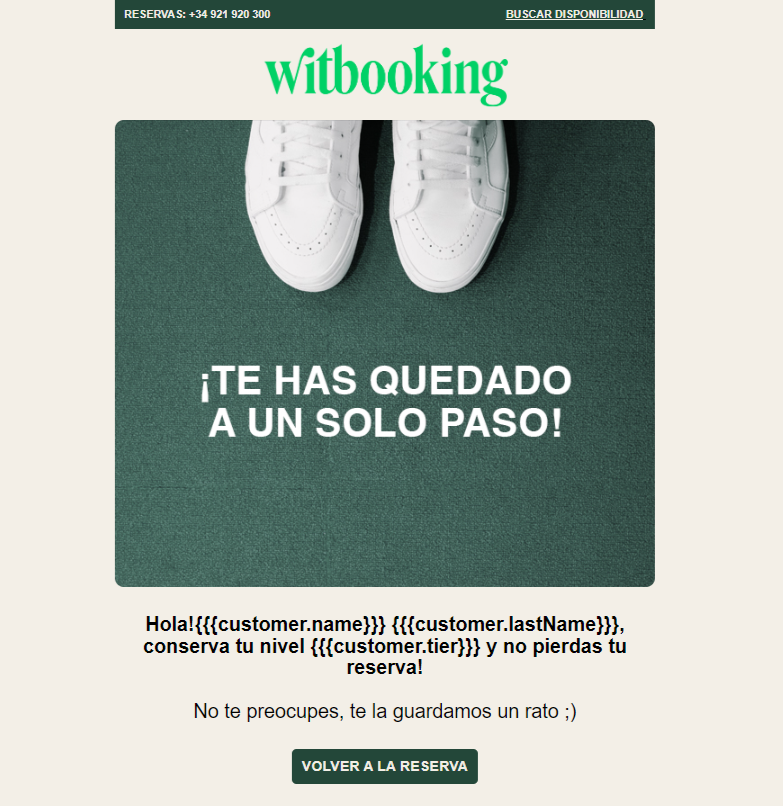
HTML template example:
(the styles are those from the usage example)
<!DOCTYPE HTML PUBLIC "-//W3C//DTD HTML 4.01 Transitional//EN" "http://www.w3.org/TR/html4/loose.dtd"> <html> <head> <meta name="viewport" content="width=device-width, initial-scale=1, maximum-scale=1, user-scalable=0"/> <meta http-equiv="Content-Type" content="text/html; charset=UTF-8"/> <style type="text/css"> ReadMsgBody{width: 100%;}.ExternalClass{width: 100%;}.ExternalClass, .ExternalClass p, .ExternalClass span, .ExternalClass font, .ExternalClass td, .ExternalClass div{line-height: 100%;}body{-webkit-text-size-adjust:100%; -ms-text-size-adjust:100%;margin:0 !important;}p{margin: 1em 0;}table td{border-collapse: collapse;}img{outline:0;}a img{border:none;}@-ms-viewport{width: device-width;}</style> <style type="text/css"> @media only screen and (max-width: 480px){.container{width: 100% !important;}.footer{width:auto !important; margin-left:0;}.mobile-hidden{display:none !important;}.logo{display:block !important; padding:0 !important;}img{max-width:100% !important; height:auto !important; max-height:auto !important;}.header img{max-width:100% !important;height:auto !important; max-height:auto !important;}.photo img{width:100% !important; max-width:100% !important; height:auto !important;}.drop{display:block !important; width: 100% !important; float:left; clear:both;}.footerlogo{display:block !important; width: 100% !important; padding-top:15px; float:left; clear:both;}.nav4, .nav5, .nav6{display: none !important;}.tableBlock{width:100% !important;}.responsive-td{width:100% !important; display:block !important; padding:0 !important;}.fluid, .fluid-centered{width: 100% !important; max-width: 100% !important;height: auto !important; margin-left: auto !important;margin-right: auto !important;}.fluid-centered{margin-left: auto !important;margin-right: auto !important;}/* MOBILE GLOBAL STYLES - DO NOT CHANGE */ body, .tb_properties{font-family: Arial !important; font-size: 16px !important; color: #000000 !important; line-height: 1.5 !important; padding: 0px !important;}.buttonstyles{font-family: Arial, helvetica, sans-serif !important; font-size: 16px !important; color: #000000 !important; padding: 10px !important;}h1{font-family: Arial !important; font-size: 22px !important; color: #202020 !important; line-height: 1 !important;}h2{font-family: Arial !important; font-size: 20px !important; color: #202020 !important; line-height: 1 !important;}h3{font-family: Arial !important; font-size: 18px !important; color: #202020 !important; line-height: 1 !important;}a:not(.buttonstyles){line-height: 1 !important; border-radius: 10px;}.mobile-hidden{display: none !important;}.responsive-td{width: 100% !important; display: block !important; padding: 0 !important;}/* END OF MOBILE GLOBAL STYLES - DO NOT CHANGE */}@media only screen and (max-width: 640px){.container{width:100% !important;}.mobile-hidden{display:none !important;}.logo{display:block !important; padding:0 !important;}.photo img{width:100% !important; height:auto !important;}.nav5, .nav6{display: none !important;}.fluid, .fluid-centered{width: 100% !important;max-width: 100% !important;height: auto !important; margin-left: auto !important; margin-right: auto !important;}.fluid-centered{margin-left: auto !important;margin-right: auto !important;}}</style> </head> <body bgcolor="#F3EFE7" text="#000000" style="-webkit-text-size-adjust:none;background-color : #F3EFE7; font-family : Arial, helvetica, sans-serif; line-height : 100%; font-size : 16px; color : #000000; padding : 0px; "> <div style="font-size:0; line-height:0;"> <custom name="opencounter" type="tracking"> <custom name="usermatch" type="tracking"/> </div><table width="100%" border="0" cellpadding="0" cellspacing="0" align="center"> <tr><td align="center" valign="top"> <custom type="header"/></td></tr><tr><td align="center"> <table cellspacing="0" cellpadding="0" border="0" width="600" class="container" align="center"><tr><td><table class="tb_properties border_style" style="font-size : 16px; font-family : Arial, helvetica, sans-serif; color : #000000;background-color : transparent; border : 0px solid transparent; line-height : 100%; " cellspacing="0" cellpadding="0" bgcolor="transparent" width="100%"> <tr><td align="center" valign="top"><table align="left" border="0" cellpadding="0" cellspacing="0" width="100%"><tr> <td class="content_padding" style="padding : 0px 0px 0px 0px; "> <table border="0" cellpadding="0" cellspacing="0" width="100%"><tr> <td align="center" class="header" valign="top"><table align="left" border="0" cellpadding="0" cellspacing="0" width="100%"><tbody><tr> <td align="left" valign="top"><table cellspacing="0" cellpadding="0" style="width:100%"> <tbody><tr><td class="responsive-td" valign="top" style="width: 100%;"><table cellpadding="0" cellspacing="0" width="100%" role="presentation" style="background-color: #234739; min-width: 100%; " class="stylingblock-content-wrapper"><tr><td style="padding: 0px; " class="stylingblock-content-wrapper camarker-inner"><table cellspacing="0" cellpadding="0" role="presentation" style="width: 100%;"><tr><td><table cellspacing="0" cellpadding="0" role="presentation" style="width: 100%;"><tr><td valign="top" style="width: 50%; padding-right: 0px;"><table cellpadding="0" cellspacing="0" width="100%" role="presentation" style="background-color: #234739; min-width: 100%; " class="stylingblock-content-wrapper"><tr><td style="padding: 0px; " class="stylingblock-content-wrapper camarker-inner"><div style="line-height: 200%;"> <b><span style="font-size:12px;"><span style="font-family:Arial,Helvetica,sans-serif; color: #F3EFE7;"> RESERVAS: +34 921 920 300</span></span></b></div></td></tr></table></td><td valign="top" style="width: 50%; padding-left: 0px;"><table cellpadding="0" cellspacing="0" width="100%" role="presentation" style="background-color: #234739; min-width: 100%; " class="stylingblock-content-wrapper"><tr><td style="padding: 0px; " class="stylingblock-content-wrapper camarker-inner"><div dir="rtl" style="line-height: 200%;"> <span style="font-size:12px;"><span style="font-family:Arial,Helvetica,sans-serif;"> </span></span><b><span style="font-size:12px;"><u></span> <a target="_blank" class="buttonstyles" style="font-family:Arial,Helvetica,sans-serif;color: #F3EFE7"href="https://direct.witbooking.com/hotel/demo_urbano" title="" alias="" conversion="false" data-linkto="other">BUSCAR DISPONIBILIDAD</a></u></span></b></div></td></tr></table></td></tr></table></td></tr></table></td></tr></table><table cellpadding="0" cellspacing="0" width="100%" role="presentation" style="min-width: 100%; " class="stylingblock-content-wrapper"><tr><td class="stylingblock-content-wrapper camarker-inner"><table width="100%" cellspacing="0" cellpadding="0" role="presentation"><tr><td align="center"><img data-assetid="130495" src="https://www.smarttravel.news/wp-content/uploads/2022/11/Witbooking_Logo_verde.png" alt="" width="600" style="display: block; padding: 0px; text-align: center; height: auto; width: 50%; border: 0px;"></td></tr></table></td></tr></table><table cellpadding="0" cellspacing="0" width="100%" role="presentation" style="min-width: 100%; " class="stylingblock-content-wrapper"><tr><td class="stylingblock-content-wrapper camarker-inner"><table width="100%" cellspacing="0" cellpadding="0" role="presentation"><tr><td align="center"><img data-assetid="195424" src="https://s3.amazonaws.com/shecodesio-production/uploads/files/000/104/779/original/93dc4afd-b0c3-47d8-b01e-c9574d2fb542.jpg?1700742692" alt="" width="600" style="display: block; padding: 0px; text-align: center; height: auto; width: 100%; border: 0px; border-radius: 10px;"></td></tr></table></td></tr></table><table cellpadding="0" cellspacing="0" width="100%" role="presentation" style="min-width: 100%; " class="stylingblock-content-wrapper"><tr><td class="stylingblock-content-wrapper camarker-inner"><table cellspacing="0" cellpadding="0" role="presentation" style="width: 100%;"><tr><td><table cellspacing="0" cellpadding="0" role="presentation" style="width: 100%;"><tr><td valign="top" class="responsive-td" style="width: 100%;"><table cellpadding="0" cellspacing="0" width="100%" role="presentation" style="background-color: #F3EFE7; min-width: 100%; " class="stylingblock-content-wrapper"><tr><td style="padding: 30px 30px 20px; " class="stylingblock-content-wrapper camarker-inner"><div style="text-align: center; line-height: 150%;"> <span style="font-size:22px;"><b>Hola! {{{customer.name}}}{{{customer.lastName}}}, conserva tu nivel {{{customer.tier}}}</b><b> y no pierdas tu reserva!</b> <br><br>No te preocupes, te la guardamos un rato ;)<span></div></td></tr></table></td></tr></table></td></tr></table></td></tr></table><table cellpadding="0" cellspacing="0" width="100%" role="presentation" style="background-color: #F3EFE7; min-width: 100%; " class="stylingblock-content-wrapper"><tr><td style="padding: 10px 0px; " class="stylingblock-content-wrapper camarker-inner"><table width="100%" border="0" cellspacing="0" cellpadding="0" role="presentation"><tr><td align="center"><table border="0" cellspacing="0" cellpadding="0" role="presentation"><tr><td class="innertd buttonblock" bgcolor="#D8FF02" style=" border-radius: 5px!important; -moz-border-radius: 0px; -webkit-border-radius: 0px; color: transparent; background-color: #234739;"><a style=" font-size: 16px; font-weight: bold; font-family: Arial, helvetica, sans-serif; color: #F3EFE7; text-align: center; text-decoration: none; display: block; line-height: 100%; background-color: #234739; border: 1px solid transparent; padding: 10px; border-radius: 10px!important; -moz-border-radius: 0px; -webkit-border-radius: 0px;" target="_blank" class="buttonstyles" href="{{{urlSession}}}" title="" alias="" conversion="false" data-linkto="other">VOLVER A LA RESERVA</a></td></tr></table></td></tr></table></td></tr></table> </body> </html>HOW TO TEST THE CUSTOM TEMPLATE
During the development of the custom email, you can validate the JSON file’s structure using the following website: W3Schools Tryit Editor
HOW TO CONFIGURE THE CUSTOM TEMPLATE
To configure your custom template, follow these steps:
Access the back office of the booking engine:
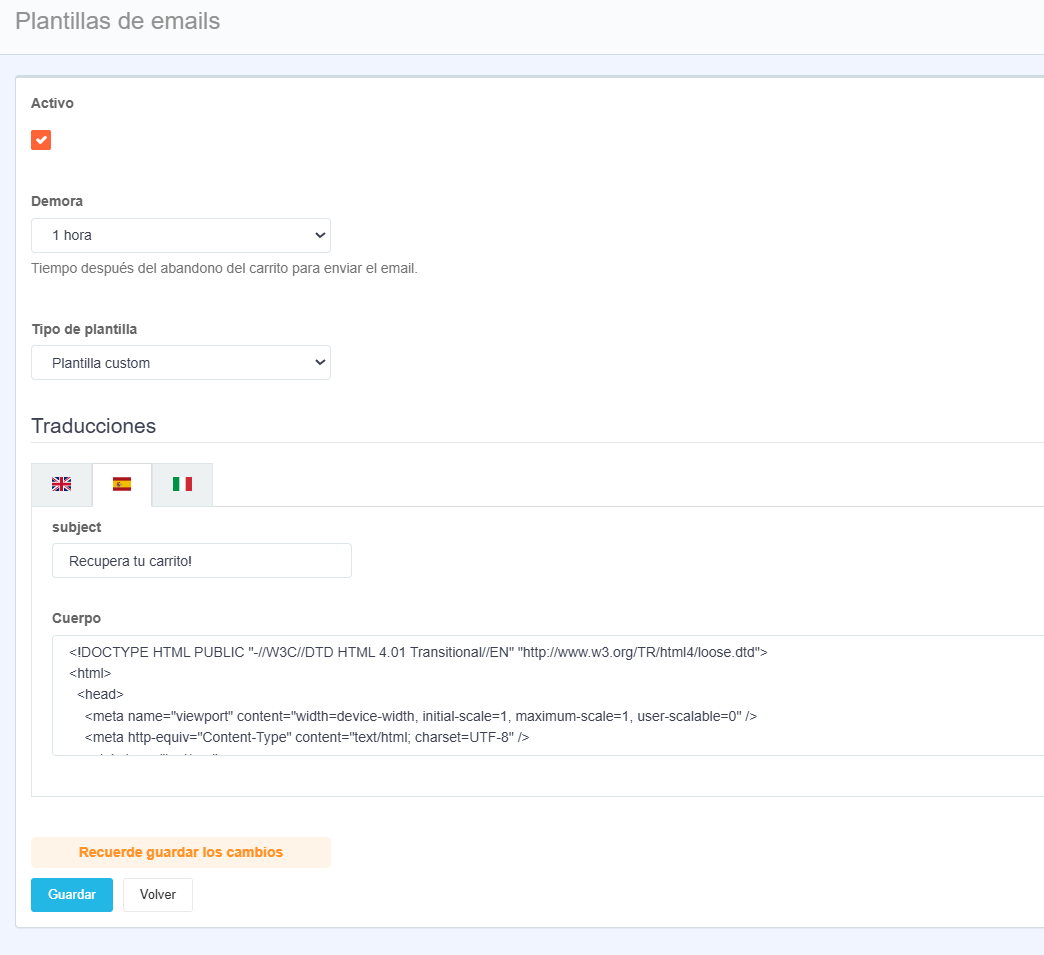
Communication > Custom Emails > Create NewActive: The checkbox must be enabled.
Email Type: Cart Abandonment
Delay: Choose the time according to your preference.
Template Type: Custom Template
Translations:
- Subject: Delete the default content and enter your custom subject line according to your preferences, in all active languages.
- Body: Enter the custom template you’ve designed, in all active languages.
Save
Run a test to confirm that it has been created correctly.
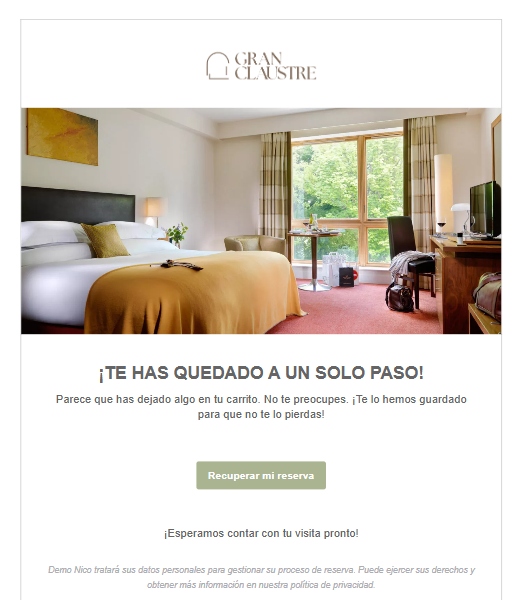
EJEMPLO PLANTILLA DEFAULT:
Was this article helpful?
That’s Great!
Thank you for your feedback
Sorry! We couldn't be helpful
Thank you for your feedback
Feedback sent
We appreciate your effort and will try to fix the article