How to set up a Google Analytics conversion funnel?
Setting up a conversion funnel in Google Analytics 4 (GA4) is quite straightforward, it can be done directly from the "explore" page of the Analytics dashboard. However, first we need to consider what parameters should be tracked to generate this funnel.
Define the funnel:
Before setting it up, we need to know what steps we want to measure.
Typical example:
Availability search (search)
Hotel selection (Wit_Property Selection)
Room selection (Wit_Accommodation Selection)
Inventory selection (Wit_Inventory Selection)
Extras selection (Wit_Extra Selection)
Start of purchase (Wit_Checkout)
Confirmation (Wit_Purchase)
If this is not defined correctly, the funnel will not be useful for analyzing user behavior in the engine.
Check that the events exist:
We need to check that the events are correctly created in our GTM. To do this, we will need to access the dashboard and verify that they are correctly created.
Create funnel in GA4:
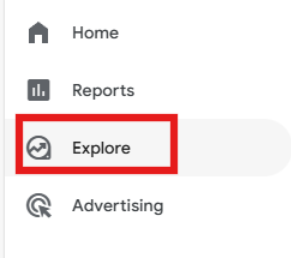
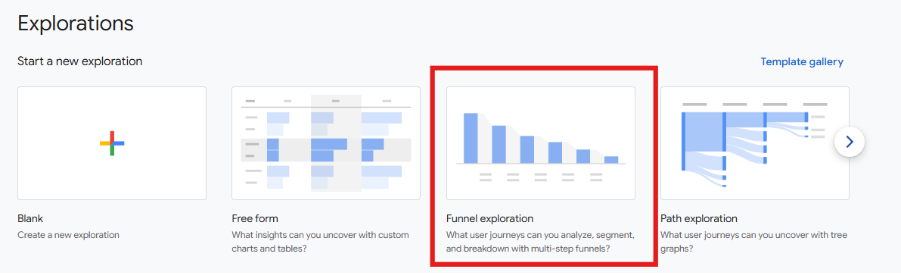
It's simple, access the Analytics dashboard and from explore – explorations – conversion funnel, the report will be created:
Setting up the funnel steps:
Within the report, we need to define each of the steps, for example:
Step 1 → event_name = search
Step 2 → event_name = Wit_Property Selection
Step 3 → event_name = Wit_Accommodation Selection
Step 4 → event_name = Wit_Checkout
Step 5 → event_name = Wit_Purchase
In this step, we can also add extra information. For example:
device
country
Etc.
Choose the type of funnel you want to create:
There are two types of funnels:
Closed funnel: The user must follow the exact order (useful if we want to analyze a strict flow).
Open funnel: The user can enter at any step.
The most common scenario in our booking engine is that the user follows the exact order of the booking steps. Although it may happen that if the user accesses the engine via URL, they are redirected to specificsteps of the engine.
Add key segmentations
This step will add value to the report. Without segmentation, we only see "what happens"; with segmentation, we understand why it happens.
When we talk about segmentation, we mean dividing the funnel into user groups to compare their behavior.
It's not the same to see: “we lose 60% in checkout”, than to see: “we lose 80% on mobile but only 30% on desktop”
Mark the conversion
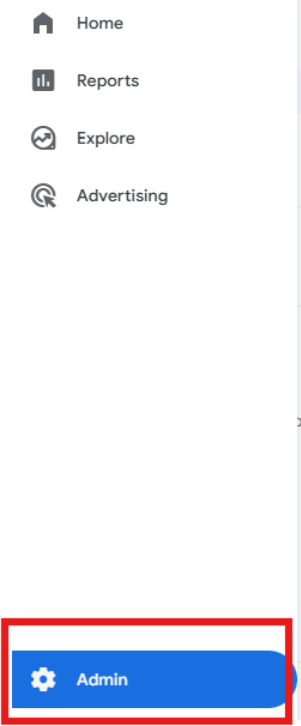
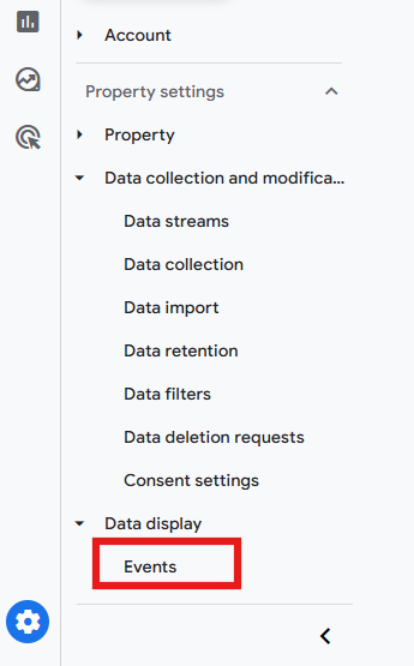
In GA4, we need to go to Admin - Events - Mark as conversion
Was this article helpful?
That’s Great!
Thank you for your feedback
Sorry! We couldn't be helpful
Thank you for your feedback
Feedback sent
We appreciate your effort and will try to fix the article