This development enables group reservations to be made. The hotel can configure the minimum and maximum number of guests, as well as the maximum number of accommodations available that can be included in such a reservation.
As a hotelier, I want to offer the possibility of creating a reservation for a group of guests (e.g., 10 adults) even when no inventory line allows accommodating the entire group in a single accommodation unit.
To activate this module, you must request it from the Support department, and once activated, the module will appear in a section within: Configuration -> Behavior -> Results Listing Configuration
We will find 3 sections:
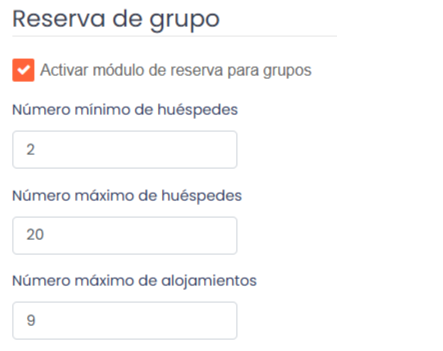
1. Minimum number of guests (required) = to configure the minimum number of guests from which a group reservation is allowed.
2. Maximum number of guests (required) = to configure the maximum number of guests allowed for a group reservation.
3. Maximum number of accommodations (optional) = a maximum number of accommodations can be configured that the hotel wishes to allow for reservation. If the field has not been filled, it can be left blank and there will be no maximum (it is recommended to set a maximum number of accommodations to reserve).
If you want to set a special cancellation policy for group reservations, you will find a section below the guest and accommodation configuration, called “Cancellation Policy Tiers”.
We can configure as many tiers as we want, and in each of them, we will have to configure the minimum number of accommodations from which the policy will apply, and which policy will be the corresponding one:
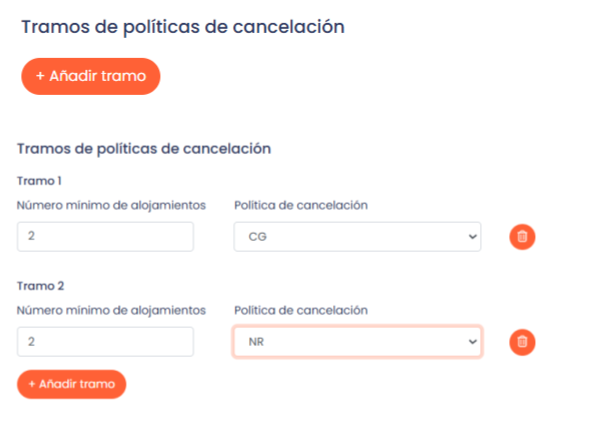
*Important: there is no need to link the policy created for groups to a condition. Instead, the policy is simply created and selected in the corresponding tier.
Once we have activated the group module from the Back Office, we will see the following appear on the front of the engine when we open the booking form:
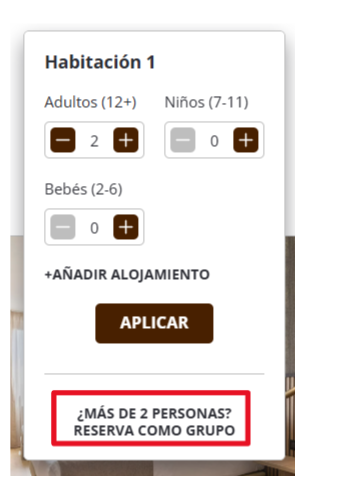
We will select the number of guests and accommodations we want for our reservation, and a modal will appear with the recommendation made by the engine. It offers us the most economical option that fits the search.
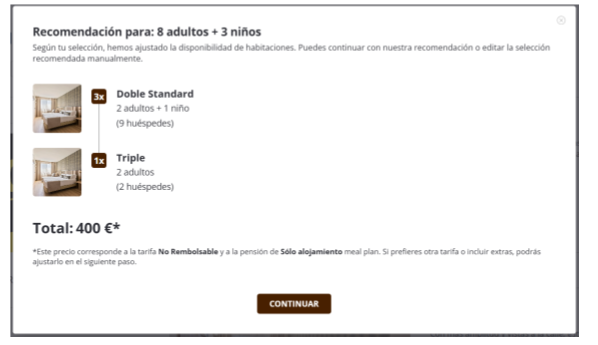
Once we click “continue”, it takes us to another screen where we can edit the initial recommendation: change rate, board basis, rooms, add extras, and we can even add more rooms, but always considering what has been configured in the Back Office.
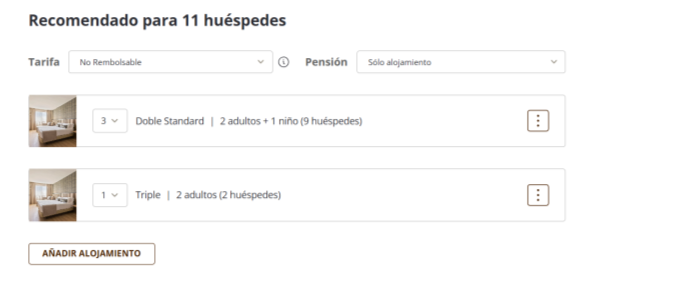
Once we have finished configuring the accommodations, we click on RESERVE and it redirects us to the checkout screen, which works the same as for individual reservations.
***
What is the Group Module?
The Group Module allows hotels to offer reservations for large groups of guests, even when there is no single room that can accommodate the total occupancy. This functionality seeks to maximize conversion in the booking engine, allowing guests to be distributed across multiple rooms based on availability and configuration.
What does this functionality allow?
With this development, you can:
Enable group reservations directly from the booking engine.
Configure the minimum and maximum number of guests for the reservation option to be activated as a group.
Set a maximum number of accommodations for these reservations (optional but recommended).
Offer room combinations that fit the total number of people, even if there is no direct option in the inventory.
Example: a client can book for 10 adults even if there isn't a room for 10, and the engine will suggest a combination like 4 doubles + 1 single.
Back Office (BO) Configuration
To activate and configure the Group Module:
Go to the menu: Configuration Manager > Behavior > Results Listing Configuration.
Activate the “Group Module” checkbox (disabled by default).
Configure the following parameters:
Minimum number of guests (required): from how many guests a reservation is considered a group reservation.
Maximum number of guests (required): up to how many guests a group reservation can be made.
Maximum number of accommodations (optional): if not configured, the number of accommodations will not be limited, but it is recommended to set a limit.
How does it work in the booking engine (front)?
a) Visual activation
When the module is active, a message will appear in the reservation form:
More than X people? Book as a group (X = minimum number configured in BO)
b) Occupancy selection
The user can select the desired number of adults, children, and accommodations.
The engine will automatically suggest the best possible combination of available rooms.
c) Recommendation modal
When searching:
The system will show the most economical option available.
If an exact combination does not exist, it will offer the closest one (always within the configured limits).
Example of recommendation:
4 x Double (2 adults)
1 x Single (1 adult)
Total price includes mandatory extras but does not include taxes.
Applicable discounts are calculated directly in the displayed price.
d) Accommodation configuration screen
From here the client can:
Change rate or board basis (incompatibilities will be notified).
Add or remove extras per accommodation.
Edit/remove accommodations or add more, respecting the limits of guests and rooms.
View the total price (with discounts and mandatory extras).
Note: Taxes are not yet shown on this screen.
If the client reduces the number of guests compared to the original search, they are allowed to continue. If they try to increase the number beyond what is configured, the system will prevent it.
The "Book and Join" option will also appear if the engine has it enabled.
e) Reservation process
After confirming the accommodation distribution, the client clicks on "RESERVE", being redirected to the checkout screen, which works as in the usual flow.
Additional considerations
Loyalty program:
Opt-out: The discount is applied automatically and the checkbox appears marked.
Opt-in: The checkbox is available for the client to activate manually.
Discounts: They are applied normally, as in the rest of the engine.
Age filter: Currently, it is not applied to group reservations.
Taxes: They are only shown on the final checkout screen.
Reservation identification: Reservations made through the module will have the tag group_module.
Was this article helpful?
That’s Great!
Thank you for your feedback
Sorry! We couldn't be helpful
Thank you for your feedback
Feedback sent
We appreciate your effort and will try to fix the article